
Registration Instructions
Description
How to Register to Bid
1. Create an Account
(If you already have an Auctions International account, skip this step.)
- Click “Register To Bid”.
- Enter promo code NJBID to waive the one-time $10 membership fee.
- Add a valid credit card for identity verification. (Visa/MasterCard/Discover only – AmEx not accepted)
- Here is a website tutorial to watch
2. Complete the Auction Registration Packet
(required for every real estate auction)
Choose one of the following methods:
- Option A: "Get Approved to Bid" Button
- Click "Get Approved to Bid" located beneath any lot in the auction bid gallery and a registration packet will be sent to you.
- Option B: E-Sign
- Request an electronic packet here: CLICK HERE
- You will receive an email from GoFormz by the next business day (check your Spam/Junk if you don’t see it).
- Option C: Printable Packet
- Download the printable packet here: CLICK HERE
- Fill it out and return to our office: 11167 Big Tree Rd. East Aurora, NY 14052
- Option D: Absentee Packet
- Please call (800) 536-1401 Ext. 111 to have an Absentee Bidder Packet mailed to you.
- Fill it out and return to our office: 11167 Big Tree Rd. East Aurora, NY 14052
- All registration packets must be received by Friday, December 4th
- Late registration packets will not be accepted
3. Submit your refundable deposit to the State
(Refundable deposit: If you are successful this $5,000 goes towards purchase price. If you are not the successful high bidder it will be returned to you, or destroyed.)
Check Amount: $5,000.00
Check made out to:
Treasurer, State of New Jersey
33 West State Street, 9th Floor
PO Box 229
Trenton, NJ 08625
Attention Real Property
*We ask that you give us one business day to get all requests and registration packets processed. If you are missing information we will notify you by phone or email.*
More lots in this auction
 Lot 315969
Helpful Links
Bidding ends
December 5, 2026
New York
 Lot 315970
Real Estate Auction FAQs
Bidding ends
December 5, 2026
New York
 Lot 315971
Test Bidding Here
Bidding ends
December 5, 2026
New York
 Lot 315972
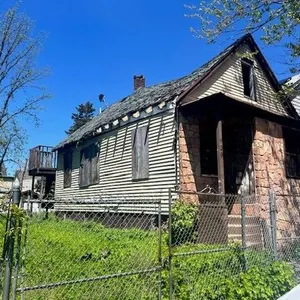
139 Alexander St, Newark, NJ 07106
Bidding ends
December 5, 2026
New York